The missing Mac app for npm.
CodeKit lets you find, install, and manage npm packages with one click.
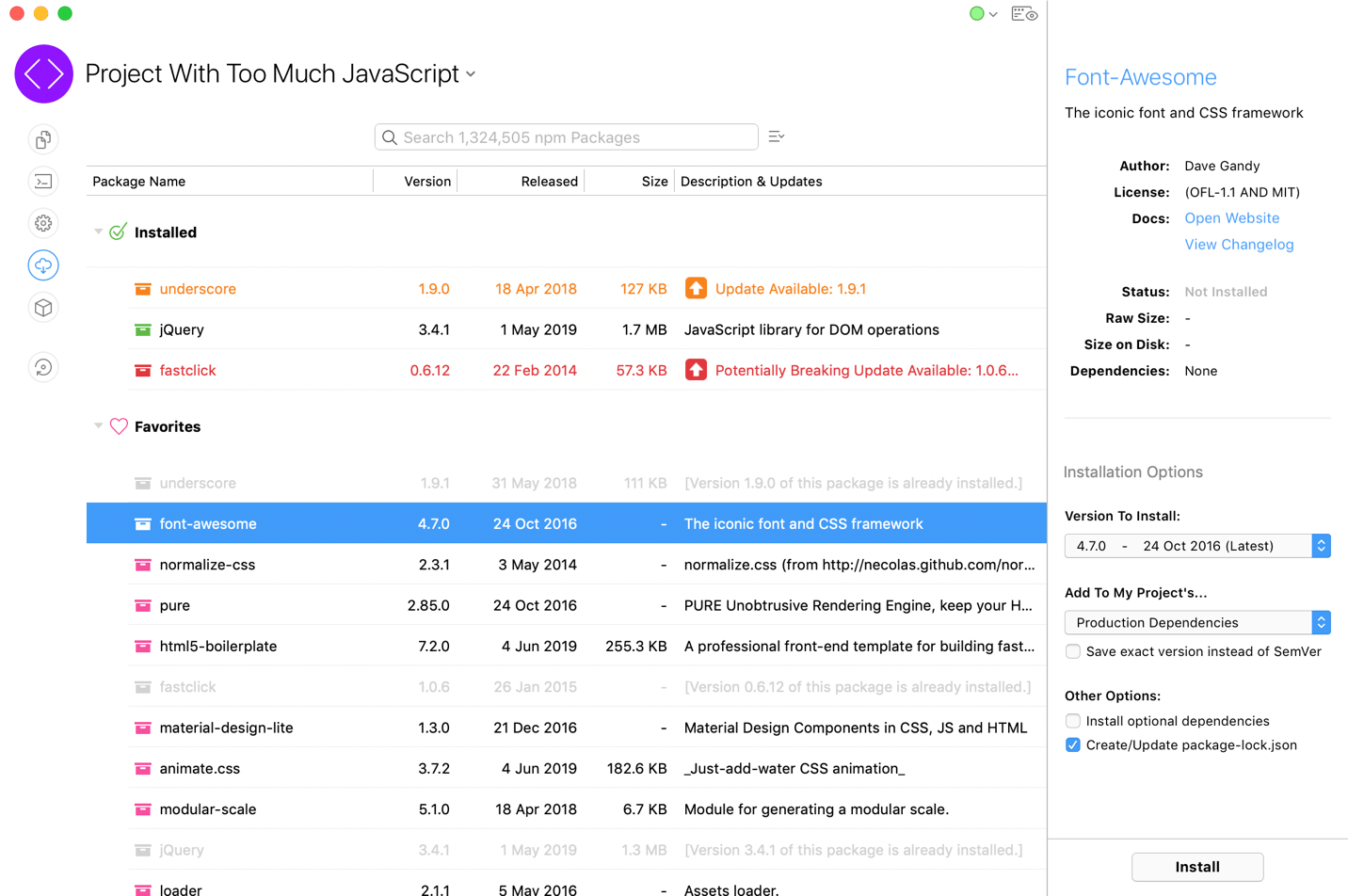
1983 Wants Its Command Line Back.
It's not that you can't use a CLI, it's that you shouldn't have to. CodeKit makes npm faster and easier than the command line.
-
 Effortless Info
- You'd need 17 Terminal commands to get all the information in that screenshot. CodeKit fetches it automatically.
-
 Zero Setup
- There's nothing else to install or configure. Just drop a folder on CodeKit's window and start installing packages.
-
 Really, Really Fast
- CodeKit is a native Mac app, not Electron garbage. A smooth UI, low memory usage, and a jet engine under the hood.
-
 Totally Standard
- CodeKit is 100% standard npm. Full support for package.json files. No proprietary hacks or "extra" stuff that locks you in.
-
 Instant Changelogs
- Is it safe to update that package? Don't waste time searching; see the changelog or the website in one click.
-
 Regular Updates
- CodeKit has been around since 2011, with 107 updates. You can expect new features and constant improvements.
Watch The Screencast
A whole walkthrough in 5 minutes. Or read the full documentation.
More Than Just npm
CodeKit isn't just for npm. It makes every part of building for the web easier. Use as much or as little as you like:
-
 Image Optimization
- Reduce PNG, GIF, JPEG, and SVG file sizes by up to 75% for faster page-loads. Details »
-
 Browser Refreshing
- Auto-refresh and sync browsers across devices as you work. No plugins. No setup. Details »
-
 Compile Languages
- Compile languages like Sass, Less, TypeScript, Pug, Markdown, and more. Details »
-
 Minify & Bundle JavaScript
- Combine and minify JS files. Transpile with Babel. Bundle ES6 modules. No config files. Details »
...and much more. See everything CodeKit does
Fair Pricing
Buy once. Use forever.
No subscription — a one-time purchase with 13 months of free updates, and old versions keep working forever. Renew only when you want new features.